


 Create a custom theme
 3
3

Ecco come gestire le categorie del tuo blog:
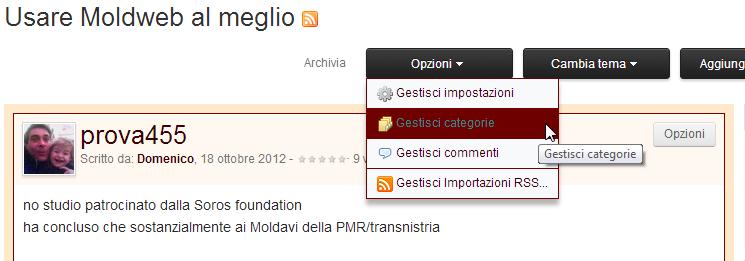
1. entra nel blog e clicca su "opzioni" e nel menu a tendina che si apre scegli "Gestisci categorie"
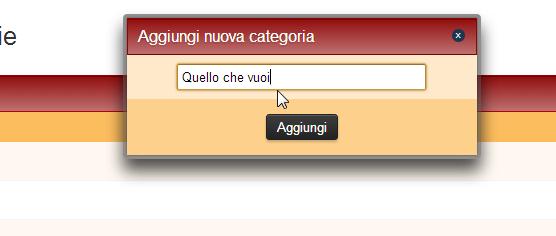
2. clicca su aggiungi categoria
3. inserisci il nome della categoria
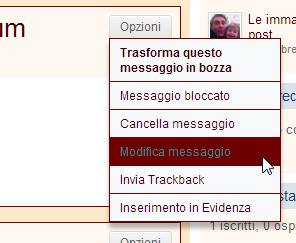
4. per spostare in una determinata categoria un messaggio già scritto, entra nel messaggio e da opzioni clicca su modifica
5. dal menu a destra spunta la o le categorie nelle quali vuoi inserire il tuo messaggio. Quest'ultimo passaggio puoi farlo anche mentre inserisci un nuovo messaggio.
1. entra nel blog e clicca su "opzioni" e nel menu a tendina che si apre scegli "Gestisci categorie"
2. clicca su aggiungi categoria

3. inserisci il nome della categoria
4. per spostare in una determinata categoria un messaggio già scritto, entra nel messaggio e da opzioni clicca su modifica
5. dal menu a destra spunta la o le categorie nelle quali vuoi inserire il tuo messaggio. Quest'ultimo passaggio puoi farlo anche mentre inserisci un nuovo messaggio.


